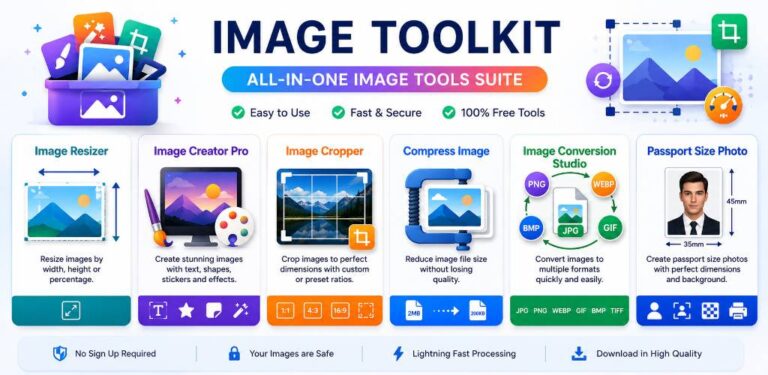
Image Toolkit
Image Toolkit is a powerful and easy-to-use image editing and image utility app designed to help you resize, crop, compress, convert, create, and customize your images in one place.
Whether you are a content creator, student, designer, photographer, business owner, or everyday smartphone user, Image Toolkit provides a convenient collection of image tools for your daily needs.
Image Resizer
Resize images quickly using custom width and height. Maintain the correct aspect ratio and prepare images for websites, social media, documents, profiles, and other platforms.
Image Creator Pro
Create custom images using text, shapes, colors, backgrounds, stickers, and creative elements. Design simple graphics directly from your device.
Image Cropper
Crop unwanted areas from your photos and choose custom dimensions or popular aspect ratios. Perfect for profile pictures, posts, thumbnails, and documents.
Compress Image
Reduce image file size while maintaining good visual quality. Compressed images are easier to store, share, and upload.
Image Conversion Studio
Convert images between popular formats such as JPG, JPEG, PNG, WebP, GIF, BMP, and other supported formats.
Passport Size Photo
Create passport-size and ID-style photos with convenient sizing and layout options.
✨ More Image Features
can also provide a variety of creative and useful image utilities, including:
Image Filters & Effects
Image Enhancer
Image Upscaler
Watermark Maker
Image to PDF
Image Color Picker
Social Media Image Resizer
Photo and Image Optimization Tools
📱 Mobile-Friendly Design
🚀 Simple & Convenient
Select an image, choose your desired tool, make your changes, preview the result, and save or export your finished image.
Whether you need to resize a photo, crop an image, compress a large file, convert JPG to PNG, create a sticker, make a passport photo, or apply creative effects, Image Toolkit brings useful image tools together in one app.
Image Toolkit – Your all-in-one image editing and image utility toolkit.
is an all-in-one collection of image editing and image utility tools for resizing, cropping, compressing, converting, creating, and optimizing images.
tool includes Image Resizer, Image Creator Pro, Image Cropper, Image Compressor, Image Converter, Passport Size Photo Maker, Image Enhancer, Watermark Maker,
Yes.
Time needed: 5 minutes
- s Image Toolkit easy to use?
Yes. Select an image, choose a tool, make your changes, preview the result, and save or export the finished image.
Download > image toolkit
https://play.google.com/store/apps/details?id=com.imagetoolkit.app&pcampaignid=web_share
Leave a Reply